SSI’s Directional Path Tool allows users to trace chains of dependencies in either a backward (predecessors) or forward (successors) direction, starting from a designated focus point. This enables clear visualization of how activities in the schedule are influenced by upstream drivers or how they impact downstream successors. In this course you will learn about Driving Slack, which you only get from SSI Tools, and is the most accurate way to determine the critical or driving path to any selected activity in your schedule.
Select Get Driving Path from the Dependency Analysis group:
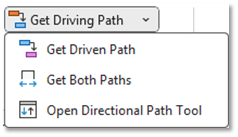
You can also select Get Driven Path or Get Both Paths from the quick access menu:
You can also open the Directional Path Tool Form to set definitions for how you want the analysis to be performed and how you want the output to be displayed: